
Agent tools

Give an agent hands, not the keys

Expose each capability as a function that runs with the caller's identity, so the database decides what the agent can touch.

tools
volcano cloud functions deploy --alllookup-customer  deployed   publicissue-refund     deployed   publicvolcano cloud functions update issue-refund --private✓ issue-refund is now private# an anon key alone can no longer reach itvolcano cloud functions logs issue-refund --type runtime --followuser 8f1c… → refund 4821 · $42.00 · allowed by policy
Overview

The dangerous part is the tool, not the model

A tool is an API you have handed to something that improvises. The usual shortcut is one service account with broad rights and a promise that the prompt will keep it in line, which holds right up until someone phrases a request cleverly enough.

Make each tool a function that runs as whoever asked. The identity arrives verified on the event and the tool queries under that user's row-level policies, so the boundary is the same one your app already relies on rather than a promise about the prompt.

Shape

One capability, one function

Each tool is a small function with its own runtime, logs and visibility. Adding a capability does not mean touching a shared service that everything else depends on.

  • Python, Node or Ruby per tool
  • Independent deploys and independent logs
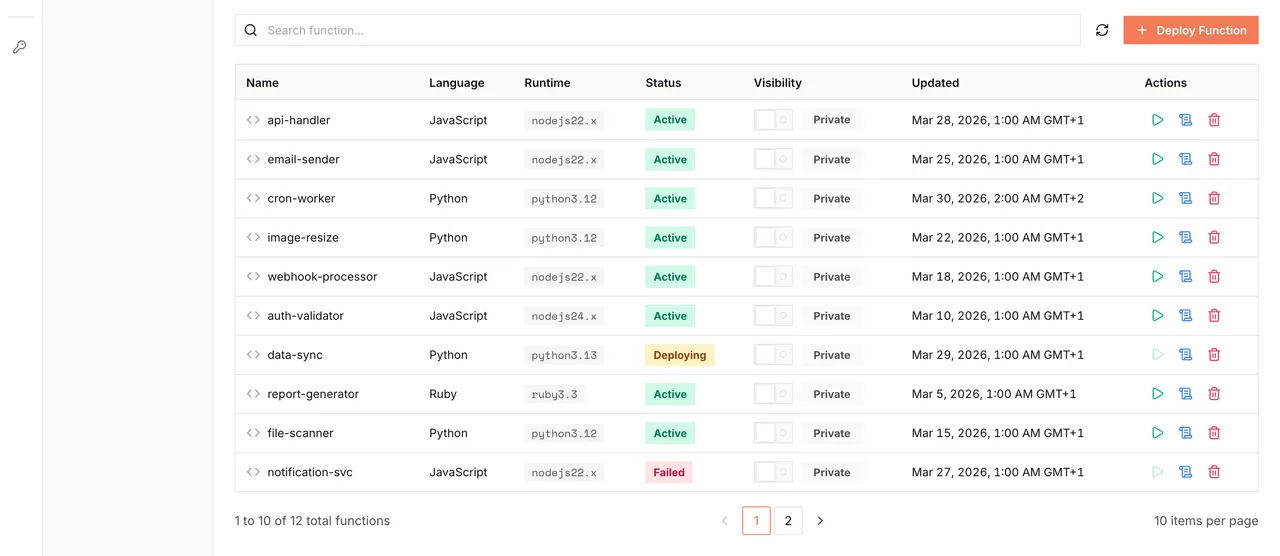
  • Public takes the anon key; private needs a session
volcano cloud functions list
lookup-customer   python3.12   public    180s  invoke: https://b48c0d17.functions.volcano.run/search-invoices   python3.12   public    180s  invoke: https://2f6e81a9.functions.volcano.run/issue-refund      python3.12   private   180s  invoke: https://7a1f92b4.functions.volcano.run/close-account     python3.12   private   180s  invoke: https://c05b7e32.functions.volcano.run/# the destructive ones refuse a bare anon key
Identity

The caller comes with the call

Volcano verifies the session and puts the user on the event before your code runs. The tool never parses a token, and it never has to decide who it is acting for.

  • user_id, email, role and project_id on the event
  • Same identity the database sees as auth.uid()
  • No shared service account to over-scope
volcano.dev/dashboard/edge-function
Deployed tools, each private until you publish it
Limits

Refuse in the database, not the prompt

A tool that connects as the caller inherits their policies, so an unauthorized action fails at the query rather than at a guardrail you wrote. Turn the refusal into a 403 and let the agent explain it.

  • Policies are the same rules your app uses
  • Denied writes surface as errors, not silent success
  • Nothing to keep in sync with the prompt
issue-refund, two callers
# same tool, same arguments, different userada  (owns order 4821)   → 202 refund queuedcleo (does not own it)   → 403 not permittedthe policy decided, not the prompt
Path to production

How it works

  1. 01

    Pick the capabilities

    One function per verb the agent needs. Keep each one narrow enough to describe in a sentence.

  2. 02

    Read the identity

    Take the user off the event and connect as them, so the database applies their policies.

  3. 03

    Guard the sharp ones

    Mark destructive tools private so an anon key cannot reach them, and let the policy decide the rest.

  4. 04

    Describe the tools

    A JSON schema per tool, generated from the same list you deploy, so the two cannot drift.

Code

A tool, its guardrail, its schema, its deploy

JavaScript
const { Client } = require('pg'); const { databaseConnectionString } = require('@volcano.dev/sdk'); exports.handler = async (event) => { const auth = event.__volcano_auth; if (!auth || auth.role === 'anonymous') { return { statusCode: 401, body: JSON.stringify({ error: 'sign in required' }) }; } const { orderId, amountCents } = event; if (!Number.isInteger(amountCents) || amountCents <= 0) { return { statusCode: 400, body: JSON.stringify({ error: 'amountCents must be a positive integer' }) }; } // Connect as the caller. If they do not own this order, the policy makes the // update affect zero rows — no separate ownership check to forget. const db = new Client({ connectionString: databaseConnectionString(process.env.DATABASE_URL, { userId: auth.user_id, }), }); await db.connect(); try { const { rowCount } = await db.query( `update orders set refunded_cents = refunded_cents + $1, refunded_at = now() where id = $2 and refunded_cents + $1 <= total_cents`, [amountCents, orderId], ); if (rowCount === 0) { return { statusCode: 403, body: JSON.stringify({ error: 'not refundable by this user' }) }; } } finally { await db.end(); } return { statusCode: 202, body: JSON.stringify({ refunded: amountCents }) }; };
Return

What this removes

0service accounts to scope

Tools run as the asking user, so there is no broad key to review every quarter.

One placefor the access rule

The policy that guards your app already guards every tool you add later.

Per toollogs and visibility

Each capability deploys, logs and fails on its own instead of inside one service.

What you get

Bounded by identity

A convincing prompt still cannot exceed the caller's permissions.

Safe to extend

New tools inherit the rules instead of restating them.

Traceable

Every call is attributable to a user in the runtime logs.

Platform

Built on Volcano

Functions and agents
  • The tools themselves

    Functions in Node, Python or Ruby, deployed one at a time, each with its own logs and visibility.

Authentication
  • Who is calling

    Verified sessions delivered to the function and understood by the database as auth.uid().

Databases and vector
  • What they may touch

    Row-level policies that decide what a tool returns, written once next to the data.

File storage
  • Files a tool produces

    Reports and exports land in a bucket where policies control who can read them back.

Frequently asked questions

Read the docs
How does a tool know who is calling it?

Volcano verifies the session and attaches the user to the event as __volcano_auth, with user_id, email, role, project_id and the caller's access token. Your code reads it directly and never parses a token.

What stops the agent calling a tool it should not?

The policy, not the prompt. A tool that connects as the caller is bounded by that user's row-level policies whatever the model decides to try, so an unauthorized action fails at the query. Marking a tool private adds a second gate by refusing the anon key.

What does marking a tool private actually do?

It stops the anon key invoking it, so a page that only carries the anon key gets a 403. A signed-in user's token and the service key still reach it, which is why the row-level policy remains the real boundary for anything destructive.

How long can a tool run?

Up to 180 seconds per call. Long work should write its progress and continue on a later call rather than trying to finish inside one invocation.

How do I describe tools to the model?

Generate the JSON schema from the same array you deploy from. Keeping one source means a renamed function cannot leave a stale description behind.

Can a tool call another tool?

Yes, over HTTP. The caller's access token is on the event as __volcano_auth.access_token, so forward it and the second tool runs as the same user rather than escalating partway through the chain.

Ready to expose your first tool?

Build, deploy, and scale on Volcano's global platform — free to start, with no infrastructure to manage.

Explore more solutions