Databases

A database whenever you need one

Create real PostgreSQL in a command, size each one for its job, and stop rationing environments.

databases
volcano cloud databases create staging --pg-version 16staging  active  postgresql 16  volcano-db-xsvolcano cloud databases migration up --all -d staging001_schema.sql  002_policies.sql  okvolcano cloud databases get staging --show-connection-stringpostgresql://…@database.volcano.dev:5432/staging?sslmode=require# one command to create, one to delete
Overview

Environments get rationed because databases are a project

When a new database means a provisioning step and someone else's calendar, teams end up sharing one staging environment. Branches queue behind each other, a load test poisons someone else's data, and the honest answer to whether a migration is safe is that nobody tried it in isolation.

Volcano databases are created in one command and deleted in another. When making one takes seconds, a database per branch stops being an indulgence — and a project can hold thousands of them.

On demand

One command, not a provisioning ticket

Name it, pick the Postgres version and the tier, and it is ready to connect to. Removing it is one command as well, so a branch database does not outlive the branch it was made for.

  • Six tiers, volcano-db-xs through volcano-db-2xl
  • Compute moves with load inside the tier
  • Thousands of databases in a single project
volcano cloud databases list
app        active   volcano-db-m    16staging    active   volcano-db-xs   16loadtest   active   volcano-db-l    16pr-482     active   volcano-db-xs   16# each one sized for what it actually does
Fidelity

Ordinary PostgreSQL, not a subset

Version 15 or 16, reachable on port 5432 over TLS, with CREATE EXTENSION available. Prisma, Sequelize, TypeORM, psql and pg_dump all work against it, because there is nothing unusual to work around — you are not limited to querying over HTTP.

  • PostgreSQL 15 or 16, chosen at creation
  • Direct connections over TLS for any driver or ORM
  • vector, uuid-ossp and pg_trgm among the extensions
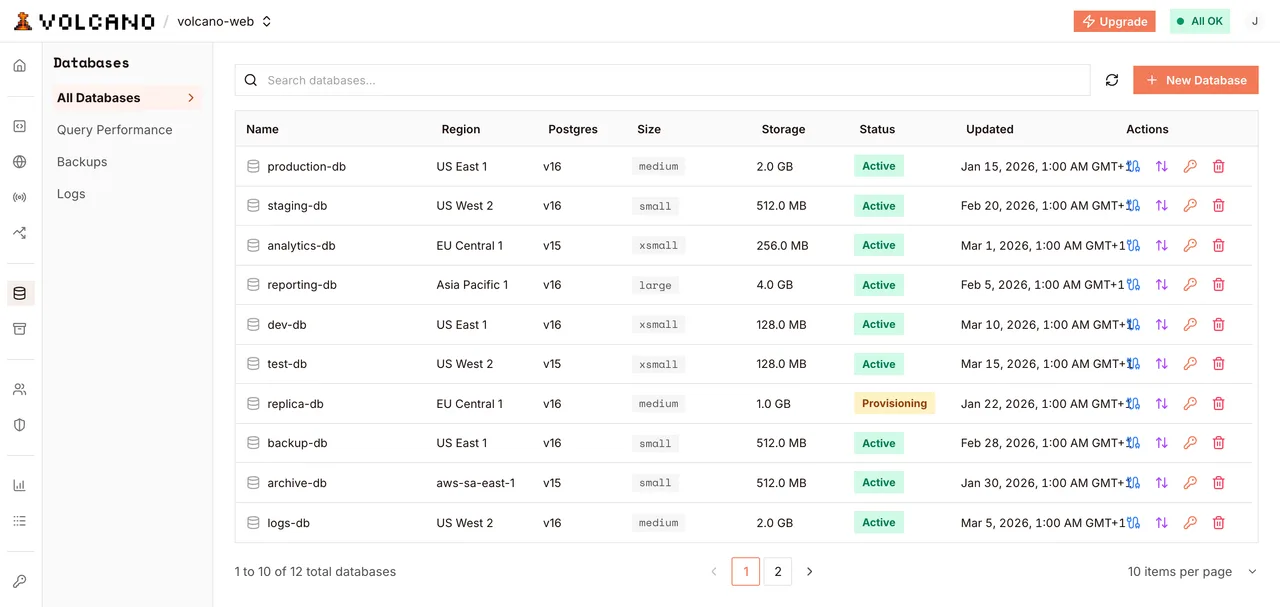
volcano.dev/dashboard/database
A project's databases, each with its own region, version and tier
Access

The connection knows who is asking

Volcano establishes the caller's identity on the connection before your first statement, so auth.uid() resolves inside your policies. One connection string covers migrations, queries on behalf of a signed-in user, and anonymous reads — you choose the access mode when you connect.

  • Full access for DDL, migrations and backfills
  • As a signed-in user, with policies enforced
  • As an anonymous visitor, for public reads
one string, three modes
# same database, same query, different callerfull access       → migrations, adminuser 8f1c…        → auth.uid() = 8f1c…anonymous         → auth.uid() is NULLpolicies do the rest
Path to production

How it works

  1. 01

    Create it

    Name it, pick the Postgres version and the tier, and it is ready in a command.

  2. 02

    Migrate it

    Plain .sql files under volcano/migrations, applied in alphabetical order.

  3. 03

    Protect it

    Turn on row-level security and write policies against auth.uid() before you expose it.

  4. 04

    Throw it away

    Delete a branch database when the branch merges. Nothing was reserved for it.

Code

Create, migrate, secure, query

Shell
volcano use my-project # Postgres 16 by default; pass --pg-version 15 if you need it volcano cloud databases create app --region aws-us-east-1 --pg-version 16 # Throwaway environments, sized independently volcano cloud databases create staging --type volcano-db-xs volcano cloud databases create loadtest --type volcano-db-l volcano cloud databases list # The string works with psql, your ORM, anything speaking the wire protocol volcano cloud databases get app --show-connection-string # Done with a branch? Remove it. volcano cloud databases delete loadtest
Return

What changes when a database takes seconds

10,000databases per project

Enough that a branch database is never the thing you have to ration.

2Postgres versions

15 or 16, chosen per database, so you can test an upgrade beside the original.

6 tiersfrom xs to 2xl

Size staging and production independently instead of sharing one instance.

What you get

An environment per branch

Isolated databases stop being something you have to request.

Migrations you rehearse

Try it on a throwaway copy before it reaches production.

No pooler to run

Volcano handles connections, and knows the caller before the first query.

Platform

Built on Volcano

Databases and vector
  • The database

    PostgreSQL 15 or 16 on autoscaling compute, with extensions and direct connections.

Authentication
  • Who auth.uid() returns

    Sessions Volcano applies to the connection before your first statement.

Functions and agents
  • Server-side access

    Functions receive DATABASE_URL and can query as the caller or as an admin.

Realtime
  • Changes as they happen

    Subscribe to row events on any table, filtered per subscriber by the read policy.

Frequently asked questions

Read the docs
Is this real PostgreSQL?

Yes — version 15 or 16, chosen when you create the database, with 16 as the default. It listens on port 5432 over TLS, so psql, pg_dump and ORMs like Prisma, Sequelize and TypeORM connect to it the way they would to any Postgres. Querying over HTTP with the SDK is an option, not the only door in.

Can I connect from my laptop or from CI?

Yes. The string from volcano cloud databases get --show-connection-string works anywhere that can reach the internet over TLS, so local development, CI jobs and GUI clients connect the same way your deployed functions do.

How do migrations work?

As .sql files under volcano/migrations, applied in alphabetical order by volcano cloud databases migration up. There is no tracking table, so write statements that are safe to run twice.

How many databases can I create?

Up to 10,000 in a single project, each sized on its own tier from volcano-db-xs to volcano-db-2xl. What each plan includes is on the pricing page.

Are there automatic backups?

Yes, on the paid plans. Set a daily, weekly, or monthly schedule per database, and take a backup by hand whenever you want one. Restoring is in place: the database keeps its connection string, and you can restore to any point in time inside the retention window rather than only to a backup you took.

Can I branch a database from production?

There is no branch command. Create a new database and load it from a dump, which gives you an isolated copy you can delete when the branch merges.

Ready to create a database?

Build, deploy, and scale on Volcano's global platform — free to start, with no infrastructure to manage.

Explore more solutions