File storage

Files that authorize themselves

Buckets whose access rules are SQL policies, private by default, with resumable uploads for the files that matter.

storage
volcano cloud storage bucket create user-files✓ bucket user-files · privatevolcano cloud storage policy create user-files --name own-folder \  --operation INSERT --definition "(storage.foldername(name))[1] = auth.uid()::text"✓ policy own-folder · INSERTvolcano cloud storage object upload user-files ./report.pdf 8f1c/report.pdf✓ uploaded 4.2 MB# every other object in the bucket is still private
Overview

Uploads are easy. Deciding who may read them is not

Storing a file takes an afternoon. The rest takes longer: authorizing the upload, keeping one user out of another's folder, surviving a dropped connection halfway through a large file, and producing public URLs that cannot be guessed into something private.

Volcano gives each project buckets whose access rules are written in the same style as your table policies, referencing the caller through auth.uid() plus helpers for paths and file extensions. Objects are private until you make a specific one public, and large uploads resume instead of restarting.

Rules

Access control in the language you already use

A policy is a SQL-style expression over the caller and the object path, so keeping every user inside their own folder takes one line. The rules go in volcano-config.yaml and get reviewed with the code, rather than living in a console someone changed last quarter.

  • SELECT, INSERT, UPDATE and DELETE per bucket
  • (storage.foldername(name))[1] = auth.uid()::text
  • storage.extension(name) to restrict file types
volcano cloud storage policy list user-files
own-folder-read    SELECT   foldername[1] = auth.uid()own-folder-write   INSERT   foldername[1] = auth.uid()images-only        INSERT   extension in (png, jpg, webp)own-folder-delete  DELETE   foldername[1] = auth.uid()# nothing else in this bucket is reachable
Visibility

Public is a decision per object

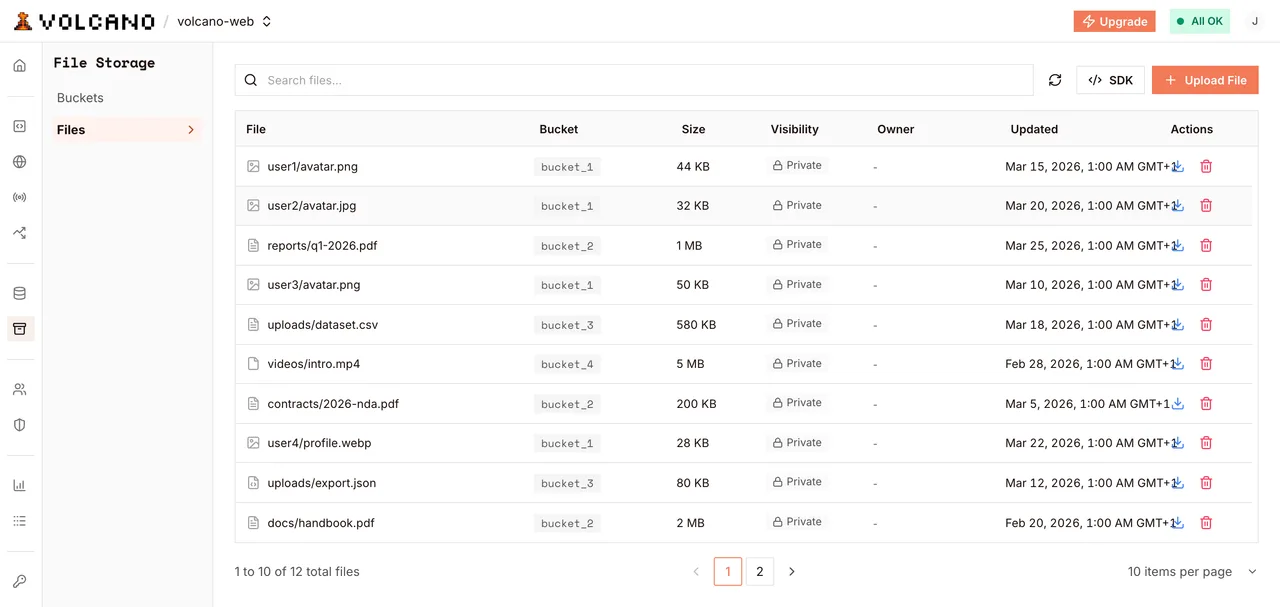
A bucket does not become public wholesale. You flip visibility on the specific file that should be shared, and it gets a stable URL that needs no SDK, no signature and no token.

  • Private by default, for every object
  • Per-file visibility, not per-bucket
  • Public URLs serve without a client library
volcano.dev/dashboard/file-storage
Objects in a bucket, each with its own visibility
Large files

Uploads that survive a bad network

Multipart uploads report progress and resume where they stopped, and the session stays valid for days rather than minutes. A video on hotel wifi finishes instead of starting over.

  • Resumable multipart with progress callbacks
  • Sessions that outlive a dropped connection
  • Upload from the browser, a function or the CLI
a 900 MB upload, interrupted
uploading  ████████░░░░░░░░  52%  468 MBnetwork    connection lostresuming   from part 47 of 90✓ complete · nothing re-sent
Path to production

How it works

  1. 01

    Create the bucket

    One command, private from the start, scoped to the project.

  2. 02

    Write the policies

    One per operation, saying who may read, write and delete, using the path helpers to scope by user.

  3. 03

    Upload from wherever

    The browser with the user's session, or a function with the service key.

  4. 04

    Share the public ones

    Flip visibility on the individual objects that belong on the public internet.

Code

Bucket, policies, upload, serve

Shell
volcano use my-project volcano cloud storage bucket create user-files volcano cloud storage bucket list # Upload, list and inspect from the CLI as well as the SDK volcano cloud storage object upload user-files ./report.pdf /report.pdf volcano cloud storage object list user-files --prefix / # Share one specific object volcano cloud storage object visibility user-files /report.pdf --public # And take it back volcano cloud storage object visibility user-files /report.pdf --private
Return

What you stop maintaining

0upload endpoints to write

The browser uploads directly and the policy decides whether it is allowed.

1 languagefor every rule

Storage policies are SQL, using the same auth.uid() as your table policies.

Per objectvisibility

Sharing one file never means opening a bucket.

What you get

Private by default

Exposure is something you opt into, one file at a time.

Rules under review

Policies live in the project manifest, not in a console's history.

Uploads that finish

Resumable multipart survives the network your users actually have.

Platform

Built on Volcano

File storage
  • Buckets and objects

    Per-project buckets, SQL policies with path and extension helpers, per-file visibility, resumable uploads.

Authentication
  • Who is uploading

    Verified sessions, so auth.uid() in a storage policy means a real user.

Functions and agents
  • Processing after upload

    Functions that generate thumbnails, extract text or scan a file once it lands.

Databases and vector
  • Metadata about the file

    Rows describing each object, protected by policies that match the bucket's.

Frequently asked questions

Read the docs
Are files public by default?

No. Every object is private when created. You make a specific file public by changing its visibility, which gives it a stable URL that needs no SDK or signing.

How do I stop one user reading another's files?

Store objects under a path that begins with the user's id and write the policy against it: (storage.foldername(name))[1] = auth.uid()::text. Uploads and reads outside that folder are rejected.

Can I restrict which file types are accepted?

Yes. storage.extension(name) is available in policies, so an INSERT policy can accept png, jpg and webp for an avatars bucket and refuse everything else.

What happens if a large upload is interrupted?

Resumable multipart uploads continue from the last completed part rather than starting over, and the session stays valid for days, so a dropped connection is recoverable.

Can a function write files?

Yes. Functions can upload, move, copy and delete with the service key, which is how thumbnailing and other post-upload processing usually works.

Can I use the storage API without the SDK?

Yes. Everything is available over REST and from the CLI, so scripts, CI jobs and one-off migrations do not need a client library.

Ready to store your first file?

Build, deploy, and scale on Volcano's global platform — free to start, with no infrastructure to manage.

Explore more solutions